A client asked me a simple question a few months ago: how much traffic is ChatGPT actually sending us? I opened their GA4, and I could not answer it. Not because the traffic was not there, but because GA4 buries it. AI visits hide inside the generic Referral row, split across a dozen domains, and a big chunk lands as Direct with no label at all.
So I built a system that catches AI referrers, isolates them into their own channel, and turns them into a report a client actually reads. Below is the exact setup, step by step, with the regex I reuse for every account. If you want the short version of why this matters, here it is.
GA4 does not track AI traffic on its own. Create a custom channel group named AI Assistants, add one high-priority channel, and paste a single Source matches regex that catches ChatGPT, Claude, Perplexity, Gemini, and Copilot. Pair it with an Exploration for historical data, then ship a monthly report. Setup takes about 30 minutes. What you measure is a floor, not a total, but a floor you can see beats a number you are guessing at.
Why GA4 Hides Your AI Traffic
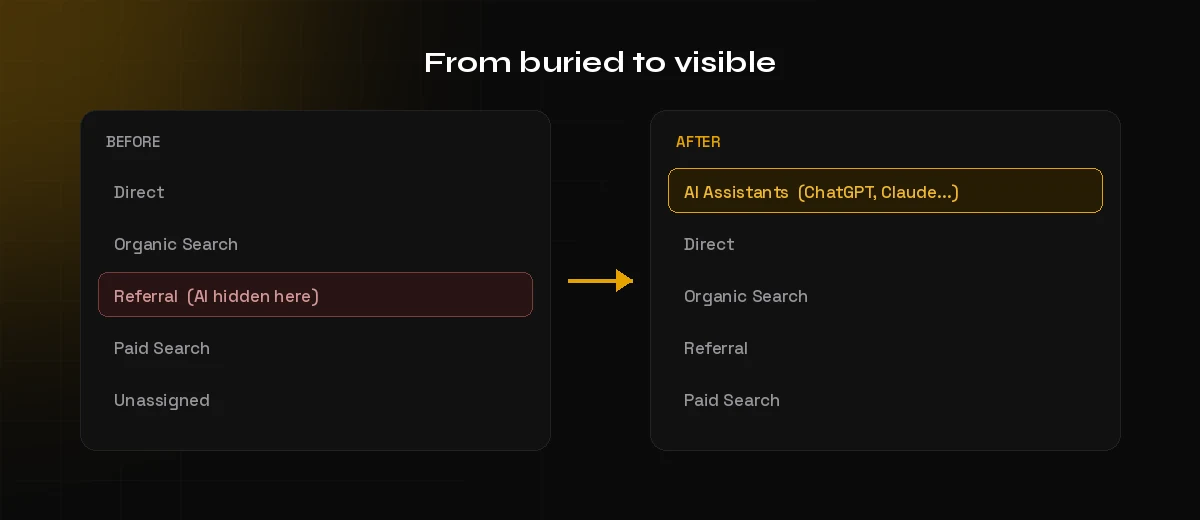
GA4 was built before AI assistants became a real referral channel, so it has no idea what to do with them. Three things go wrong by default. First, AI referrers get dumped into the catch-all Referral channel, mixed in with every other site that links to you. Second, they are split across many domains, so chatgpt.com, chat.openai.com, and perplexity.ai each show as separate rows instead of one story. Third, and most frustrating, many AI tools strip the referrer entirely, so those visits arrive as Direct with no source at all.
The fix is not a plugin or a paid tool. It is a custom channel group plus one reusable regex. Once it is in place, every standard report shows AI traffic as its own line.
How to Track AI Traffic in GA4, Step by Step
This is the full setup. You need edit access to the GA4 property. The whole thing takes around 30 minutes the first time, and about 10 minutes on every account after that once you save the pattern.
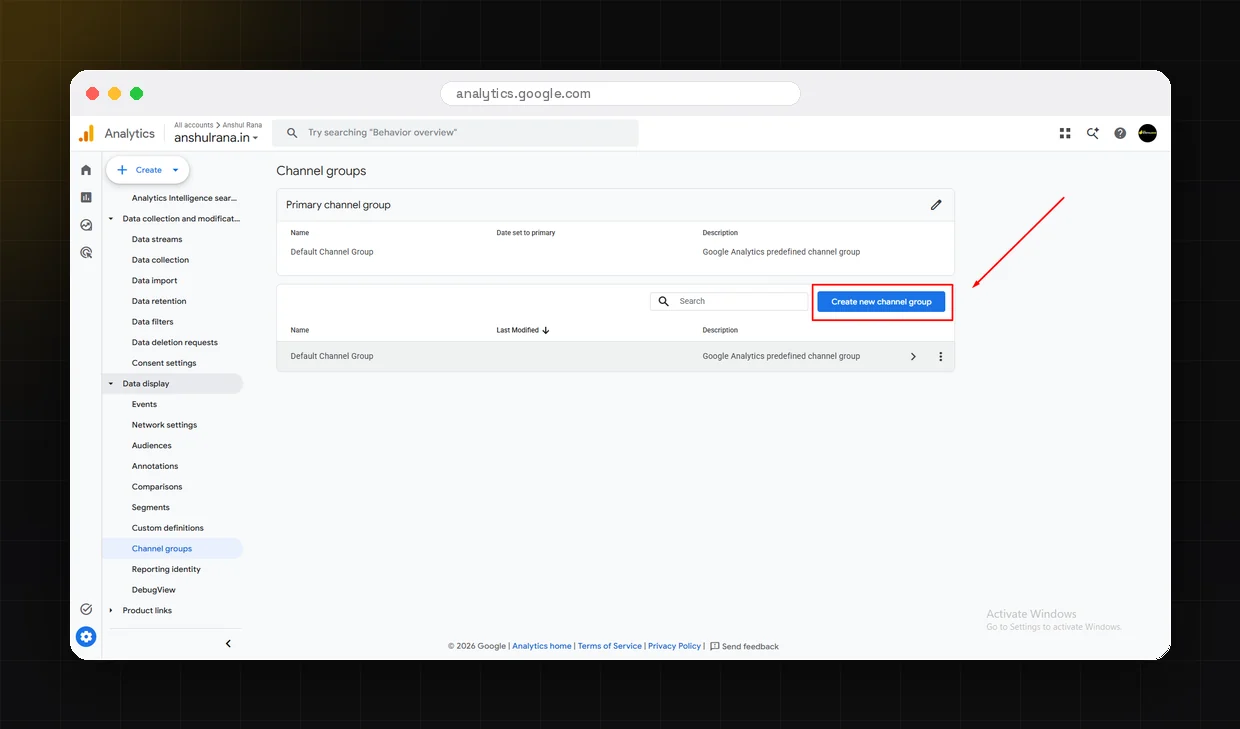
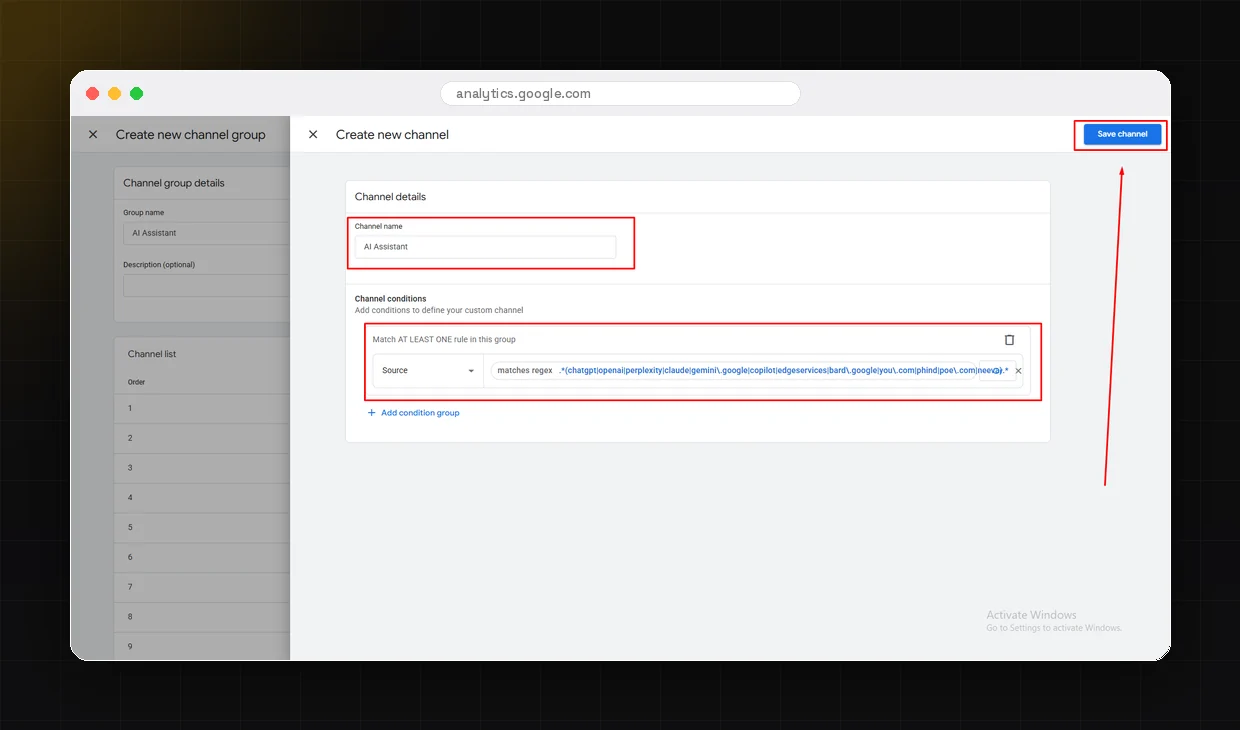
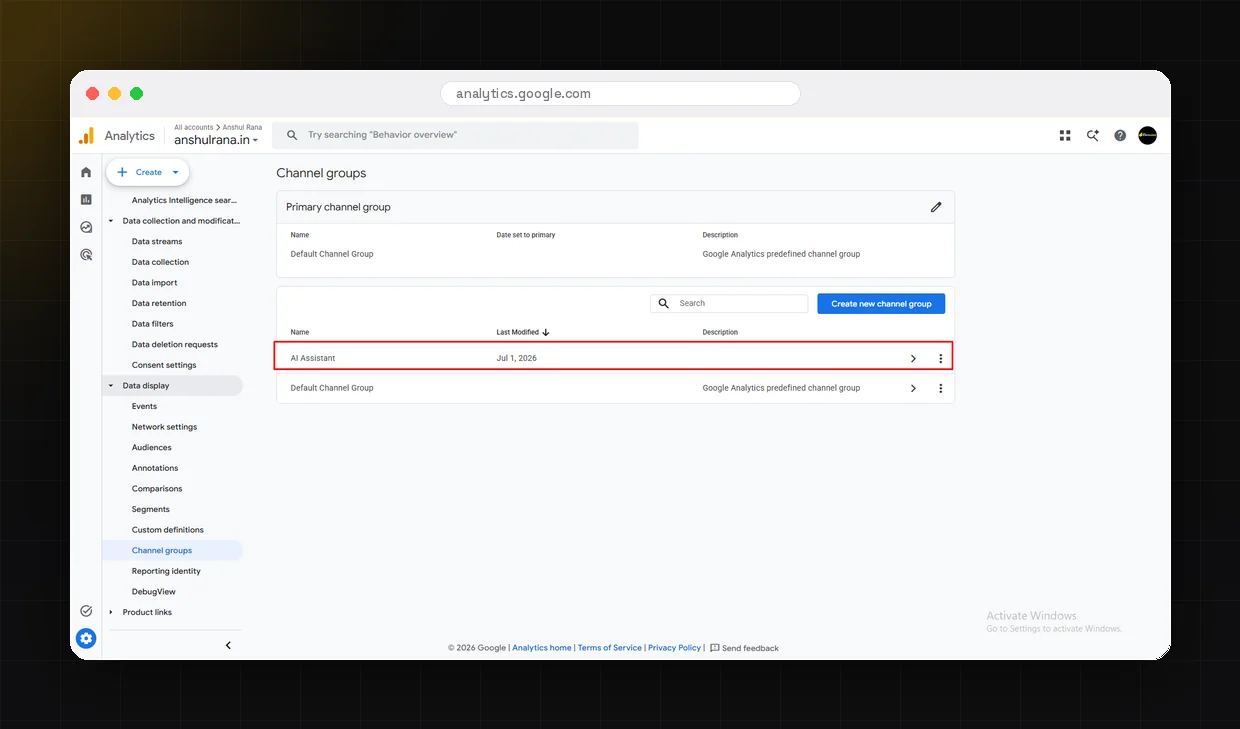
In GA4, go to Admin, then Data display, then Channel groups. Click Create new channel group and name it AI Assistants. This is the container that will hold your AI classification rules. It applies going forward from the moment you save it, so the sooner it exists, the more history you build.
Inside the new group, add a channel and drag it to the top of the list. Priority matters. GA4 classifies each session using the first rule it matches, so if your AI channel sits below Organic Search or Referral, some AI sessions will be swallowed before they reach it. Name the channel AI Assistants so it reads cleanly in reports.
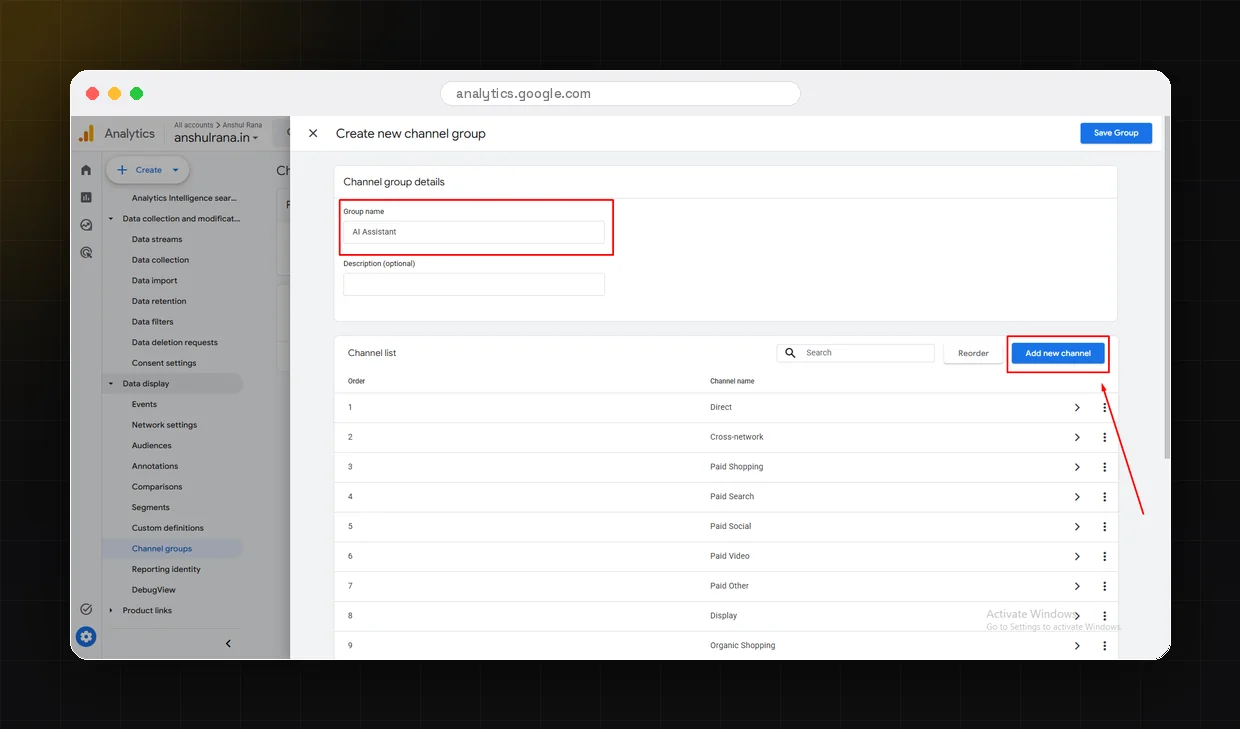
Set the condition to Source matches regex and paste a single pattern that catches every major AI referrer at once. This is the one piece I save and reuse on every new account. Here is the pattern:
.*(chatgpt|openai|perplexity|claude|gemini\.google|copilot|edgeservices|bard\.google|you\.com|phind|poe\.com|neeva).*
That single line groups chatgpt.com, chat.openai.com, perplexity.ai, claude.ai, gemini.google.com, copilot.microsoft.com, and the other common AI sources into one channel. Review it every quarter, because the tools and their referring domains keep changing.
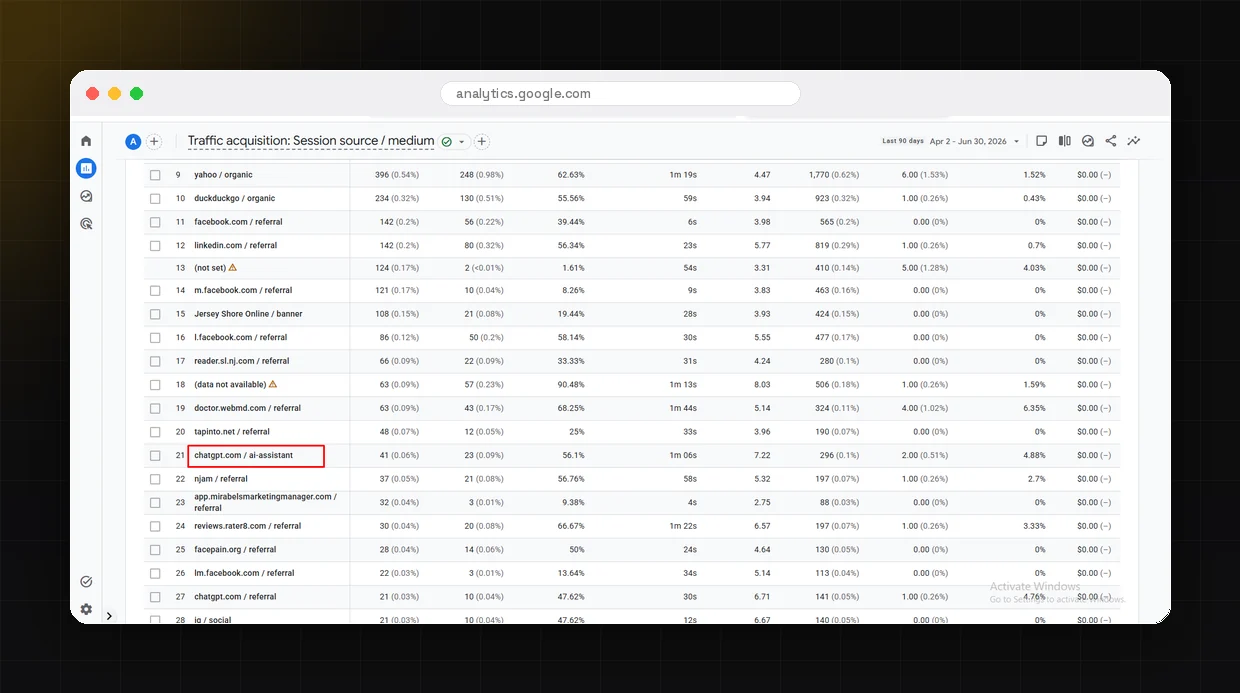
Custom channel groups do not backfill, so the group only sees traffic from today forward. To read what AI engines have already been sending you, build a free-form Exploration that pulls the full account history. Add Session source as a dimension, filter it to the same AI domains, and layer in Landing page and Engagement rate. This shows which pages AI favors and which tool sends your most engaged visitors.
The data only matters if someone acts on it. I send the same format every month: total AI sessions, share by tool, top AI landing pages, and one insight. Not a dashboard, a story. The goal is that a founder can read it in two minutes and know what to do next. That is what turns tracking into strategy.
What the Data Actually Shows
Once the system is running, the patterns show up fast. Across the accounts I have set this up on, a few things stay consistent.
The 5x number is the one that changes behavior. When a client sees that visitors arriving from AI answers convert far better than their average organic visitor, they stop treating AI search as a novelty and start building content for it. One client rebuilt their entire content plan around it after a single monthly report.
The Honest Caveat
What you measure is a floor, not a total. Plenty of AI traffic never passes a referrer and lands in Direct with no label. This system captures the AI sessions that do identify their source, which is a large and growing share, but never all of it. That is fine. A floor you can see beats a number you are guessing at, and the trend line is what drives decisions.
If you want to close more of that gap, the next layer is optimizing the content itself so AI engines cite it in the first place. Tracking tells you what is already working. The optimization work is what grows the number. For that side of the equation, read Claude SEO: How This AI Tool Is Changing SEO in 2026 and How to Audit Content for Answer Engine Readiness.
Tracking vs Optimization: Where This Fits
| Job | What it answers | Where to start |
|---|---|---|
| AI traffic tracking | How much AI traffic am I already getting, and from where? | This guide |
| Answer engine optimization | Why are AI engines citing my competitors and not me? | AEO readiness audit |
| Generative engine optimization | How do I earn more citations across ChatGPT, Claude, and Perplexity? | SEO vs AEO vs GEO |
| Hiring help | Who can run all of this for my business? | Top AI SEO experts |
If you are still deciding which discipline you actually need, SEO vs AEO vs GEO breaks down the difference, and if you would rather hand the whole thing off, the top AI SEO experts in India for 2026 covers who does this work well. And once the channel group shows where your AI referrals actually come from, optimize for the engines that are growing: Perplexity citation optimization if research queries drive your traffic, or Gemini and AI Overviews visibility if it is Google's ecosystem.
Frequently Asked Questions
Getting Started
The setup is genuinely quick, and it changes how a business sees AI search overnight. Build the channel group, save the regex, add the Exploration for history, and send one monthly report. Within a month you will know exactly which AI engines send you traffic, which pages they favor, and how well that traffic converts.
If you want this built for your account, or you want a full AEO audit that grows the number instead of just measuring it, you can reach me on Upwork, connect on LinkedIn, or visit The Digital Geek for agency-level engagements.